
memory-plusHosted2026.03.261.8m3.3k23合集GitHub@Yuchen20/memory-plus🧠 **Memory-Plus** 是一种轻量级的本地 RAG(检索增强生成)内存存储,适用于 MCP 代理。可以轻松地在会话之间记录、检索、更新、删除和可视化持久化的“记忆”——非常适合与多个 AI 编码工具(如 Windsurf、Cursor 或 Copilot)一起工作的开发者,或者任何希望他们的 AI 能真正记住他们的人。 知识管理与记忆开源协议:Apache License 2.0开发者:Yuchen20知识管理与记忆开源协议:Apache License 2.0开发者:Yuchen20服务详情工具测试交流反馈
一个轻量级的本地检索增强生成(RAG)内存存储,用于MCP代理。Memory-Plus允许您的代理在运行过程中记录、检索、更新和可视化持久的“记忆”——包括笔记、想法和会话上下文。
🏆 在Infosys剑桥AI中心黑客松中获得第一名!
主要功能
- 记录记忆:保存用户数据、想法和重要上下文。
- 检索记忆:通过关键词或主题搜索过去的条目。
- 最近记忆:快速获取最后 N 项。
- 更新记忆:无缝追加或修改现有条目。
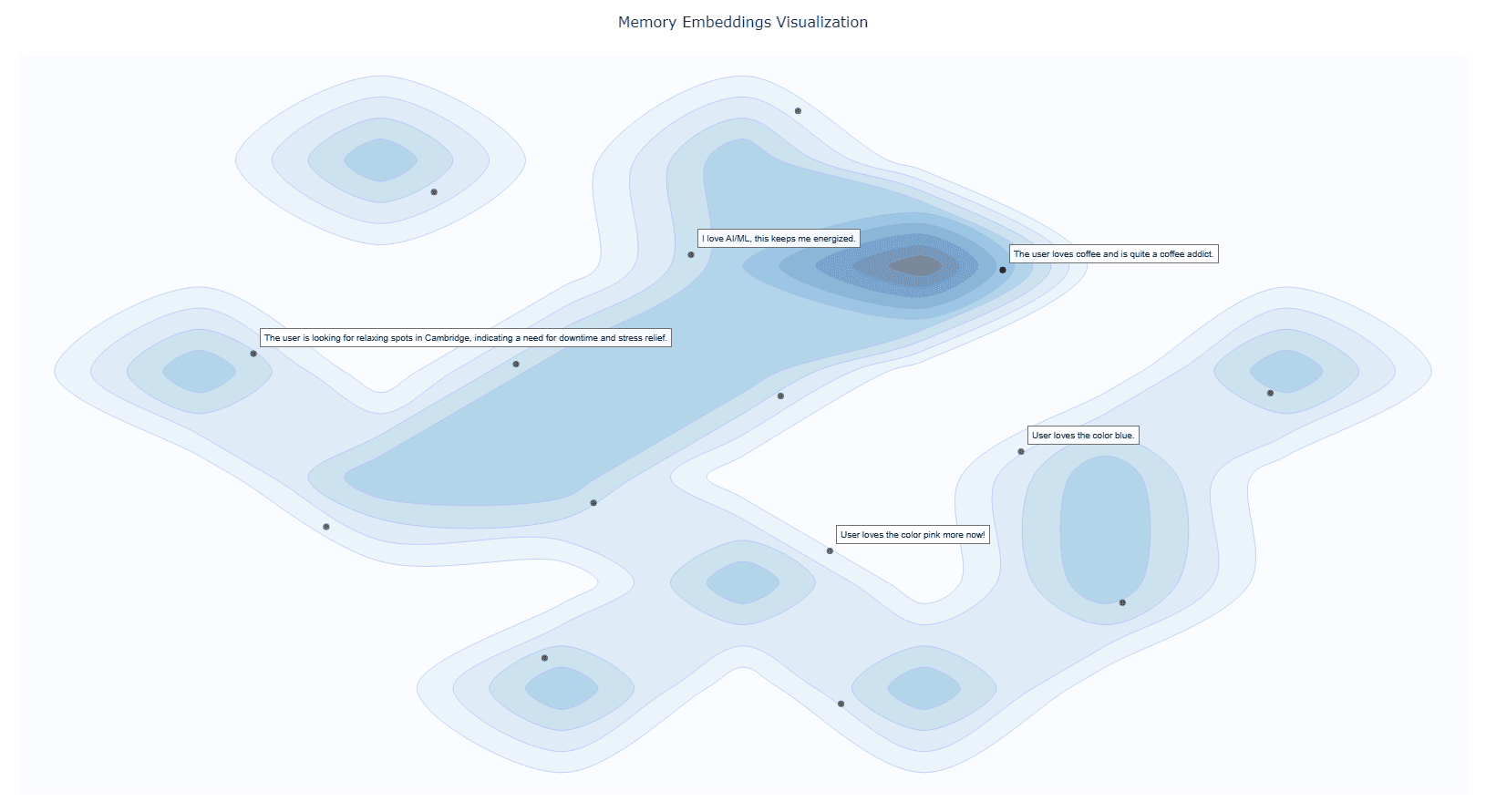
- 可视化记忆:揭示关系的交互式图集群。
- 文件导入 (_自v0.1.2起_):直接将文档摄入内存。
- 删除记忆 (_自v0.1.2起_):移除不需要的条目。
- 记忆的记忆 (_自v0.1.4起_):现在我们使用
资源来教导您的AI何时(以及何时不)回忆过去的互动。 - 记忆版本控制 (_自v0.1.4起_):当记忆被更新时,我们会保留旧版本以提供完整的记录历史。
- *
安装
1. 先决条件
Google API密钥 从Google AI Studio获取并设置为环境中的GOOGLE_API_KEY。
注意,我们将仅使用此API密钥的Gemini嵌入API,因此对您来说是完全免费的!设置Google API密钥示例
# macOS/Linuxexport GOOGLE_API_KEY="<YOUR_API_KEY>"# Windows (PowerShell)setx GOOGLE_API_KEY "<YOUR_API_KEY>"UV运行时 用于提供MCP插件。
安装UV运行时
pip install uv或者通过shell脚本安装:
# macOS/Linuxcurl -LsSf https://astral.sh/uv/install.sh | sh
# Windows (PowerShell)powershell -ExecutionPolicy ByPass -c "irm https://astral.sh/uv/install.ps1 | iex"
VS Code一键设置
点击下面的徽章以自动在VS Code中安装和配置Memory-Plus:
这将在您的settings.json中添加以下内容:
  {
"mcpServers": {
      //...,  您的其他MCP服务器
"memory-plus": {
"command": "uvx",
"args": [
"-q",
"memory-plus@latest"        ],
      }
    }
}对于cursor,转到文件 -> 首选项 -> 光标设置 -> MCP并添加上述配置。 如果您没有将GOOGLE_API_KEY添加到您的秘密/环境变量中,可以添加:
"env": {
"GOOGLE_API_KEY": "<YOUR_API_KEY>" }就在memory-plus字典中的args数组之后。
对于Cline,在您的cline_mcp_settings.json中添加以下内容:
{
"mcpServers": {
    //...,  您的其他MCP服务器
"memory-plus": {
"disabled": false,
"timeout": 300,
"command": "uvx",
"args": [
"-q",
"memory-plus@latest"      ],
"env": {
"GOOGLE_API_KEY": "${{ secrets.GOOGLE_API_KEY }}"      },
"transportType": "stdio"    }
  }
}
对于其他IDE,它应该与上述内容大致相同。
本地测试和开发
使用MCP检查器,您可以本地测试memory-plus服务器。
git clone https://github.com/Yuchen20/Memory-Plus.git
cd Memory-Plus
npx @modelcontextprotocol/inspector fastmcp run run .\memory_plus\mcp.py或者,如果您更喜欢在实际聊天会话中使用此MCP。agent.py中有一个模板聊天机器人。
# 克隆仓库git clone https://github.com/Yuchen20/Memory-Plus.git
cd Memory-Plus
# 安装依赖pip install uv
uv pip install fast-agent-mcp
uv run fast-agent setup用您自己的API密钥设置fastagent.config.yaml和fastagent.secrets.yaml。
# 运行代理uv run agent_memory.py路线图
- 内存更新
- 改进记忆记录的提示工程
- 更好的记忆图可视化
- 文件导入
- 远程备份!
- 内存管理的Web UI
如果您有任何功能请求,请随时通过添加新问题或在功能请求中添加新条目来提出。
许可证
本项目根据Apache License 2.0授权。详情请参阅LICENSE。
常见问题解答
1. 为什么memory-plus无法工作?
- memory-plus有几个依赖项,首次下载可能较慢。通常需要大约1分钟来获取所有所需的内容。
- 一旦依赖项安装完成,后续使用将会快得多。
- 如果遇到其他问题,请随时在仓库中开启新问题。
2. 如何在真实的聊天会话中使用memory-plus?
- 只需将MCP JSON文件添加到您的MCP设置中。
- 添加后,memory-plus将在需要时自动激活。
服务配置RemoteStdioHosted MCP 服务的 Remote URL是为您分配的专属连接地址,为敏感信息,请勿对外泄漏!
传输类型Streamable HTTP
GOOGLE\_API\_KEY(string)
鉴权类型无鉴权有效期24小时有效使用个人专属云资源部署MCP服务立即部署收录本MCP服务的合集11kj-mcp2026.03.29192CherryStudio2026.03.2950大肥侃子的开发工具集2026.03.29112© 2022-2026 ModelScope.cn 版权所有










Used “recent N memories” to recall last night’s debug session. Saved me from repeating the same analysis.
The free Gemini embedding API is a nice touch. No extra cost for getting solid semantic search.
Version control for memories is genius. I can track how my thoughts evolved without losing earlier versions.
First place at the Infosys hackathon says a lot. The project feels polished despite being lightweight.
Tried the file import — dropped in a PDF and it ingested smoothly. Makes onboarding reference material super easy.