
🧩 插件开发方案
1. 插件基本结构
根据 Typecho 官方文档,插件需要遵循以下基本结构: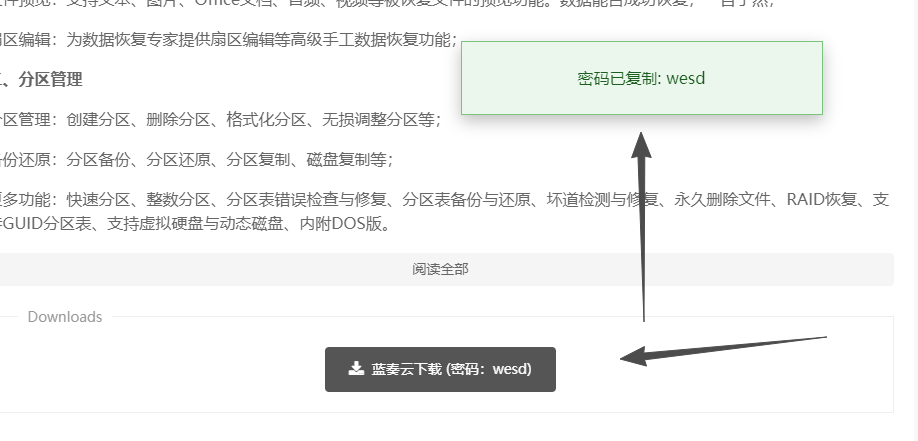
<?php
/**
 * 蓝奏云解析器
 *
 * @package LanzouParser
 * @author [你的名字]
 * @version 1.0.0
 * @link [你的网站]
 */

class LanzouParser_Plugin implements Typecho_Plugin_Interface
{
    /* 激活插件方法 */
    public static function activate(){
        // 挂载文章内容解析接口
        Typecho_Plugin::factory('Widget_Abstract_Contents')->content = array('LanzouParser_Plugin', 'parseContent');
        Typecho_Plugin::factory('Widget_Abstract_Contents')->excerpt = array('LanzouParser_Plugin', 'parseContent');
        return _t('插件已激活,请配置相关参数');
    }

    /* 禁用插件方法 */
    public static function deactivate(){
        return _t('插件已禁用');
    }

    /* 插件配置面板 */
    public static function config(Typecho_Widget_Helper_Form $form){
        // 添加配置选项
        $cache_time = new Typecho_Widget_Helper_Form_Element_Text(
            'cache_time',
            NULL,
            '3600',
            _t('缓存时间(秒)'),
            _t('解析结果缓存时间,默认3600秒')
        );
        $form->addInput($cache_time);

        $auto_fill = new Typecho_Widget_Helper_Form_Element_Radio(
            'auto_fill',
            array('1' => '开启', '0' => '关闭'),
            '1',
            _t('自动填充密码'),
            _t('开启后自动为蓝奏云链接填充密码')
        );
        $form->addInput($auto_fill);
    }

    /* 个人用户的配置方法 */
    public static function personalConfig(Typecho_Widget_Helper_Form $form){}

    /* 核心解析方法 */
    public static function parseContent($content, $widget, $lastResult)
    {
        // 处理文章内容中的蓝奏云链接
        $options = Helper::options()->plugin('LanzouParser');
        return self::parseLanzouLinks($content, $options);
    }

    /**
     * 解析蓝奏云链接
     */
    private static function parseLanzouLinks($content, $options)
    {
        // 匹配蓝奏云链接和密码的正则
        $pattern = '/(https?:\/\/[a-zA-Z0-9]+\.lanzou[b|c|t|v|s]?\.com\/[a-zA-Z0-9]+)(?:\s+密码[::]\s*([a-zA-Z0-9]+))?/i';

        return preg_replace_callback($pattern, function($matches) use ($options) {
            $url = $matches[1];
            $password = isset($matches[2]) ? $matches[2] : '';

            // 如果开启自动填充且有密码,生成增强链接
            if ($options->auto_fill && !empty($password)) {
                return self::generateEnhancedLink($url, $password);
            }

            // 否则返回原始链接
            return sprintf('<a href="%s" target="_blank" rel="nofollow">%s</a>', $url, $url);
        }, $content);
    }

    /**
     * 生成增强链接(自动填充密码)
     */
    private static function generateEnhancedLink($url, $password)
    {
        // 方案1: 生成包含密码的HTML按钮
        $html = '<div class="lanzou-block">';
        $html .= '<a href="' . $url . '" class="lanzou-link" target="_blank" data-pwd="' . $password . '">';
        $html .= '📁 蓝奏云文件 (密码:' . $password . ')</a>';
        $html .= '<button class="copy-pwd-btn" data-pwd="' . $password . '">复制密码</button>';
        $html .= '<script>/* 自动填充脚本 */</script>';
        $html .= '</div>';

        return $html;

        // 方案2: 如果需要更高级的功能,可以调用第三方解析API
        // return self::fetchDirectLink($url, $password);
    }
}
2. 功能实现要点
核心功能模块
- 链接识别:使用正则表达式匹配蓝奏云各种域名格式(
lanzoub.com、lanzoux.com等) - 密码提取:支持常见格式如"密码:2ewq"、"提取码:2ewq"等
- 内容过滤:避免在评论等非文章区域生效
增强功能选项
根据搜索结果,已有类似插件实现了七牛云、又拍云等云存储集成,你可以参考实现:
// 配置面板增强
$enable_cache = new Typecho_Widget_Helper_Form_Element_Radio(
    'enable_cache',
    array('1' => '开启', '0' => '关闭'),
    '1',
    _t('开启解析缓存'),
    _t'开启后缓存解析结果,减少请求')
);
$form->addInput($enable_cache);

$parse_mode = new Typecho_Widget_Helper_Form_Element_Select(
    'parse_mode',
    array('local' => '本地处理', 'api' => 'API解析'),
    'local',
    _t('解析模式'),
    _t('本地处理仅填充密码,API解析可获取直链')
);
$form->addInput($parse_mode);
3. 前端交互增强
为了让用户体验更好,可以添加JavaScript自动填充功能:
// 插件自动生成的JavaScript
(function() {
    // 自动复制密码
    document.querySelectorAll('.copy-pwd-btn').forEach(btn => {
        btn.addEventListener('click', function() {
            const pwd = this.dataset.pwd;
            navigator.clipboard.writeText(pwd);
            alert('密码已复制:' + pwd);
        });
    });

    // 可选:在页面打开时自动填写(需要跨域支持)
    if (window.location.href.includes('lanzou')) {
        // 检测当前页面是否为蓝奏云下载页
        // 自动填充密码并提交
    }
})();
📦 插件安装与使用
- 创建插件目录:在 Typecho 的
/usr/plugins/下创建LanzouParser文件夹 - 放置插件文件:将上述代码保存为
Plugin.php - 激活插件:进入 Typecho 后台 → 插件管理 → 激活"蓝奏云解析器"
- 配置插件:根据需要设置缓存时间、解析模式等
使用效果:在文章中直接写入:
https://wwbve.lanzoub.com/ik9fy3ib1seb 密码:2ewq插件会自动识别并生成带密码填充功能的按钮
💡 进阶实现思路
如果你想要更强大的功能,可以参考搜索结果中的几种实现:
- 直链解析:调用现有的蓝奏云解析API(GitHub上有多个开源项目),获取真实下载链接
- 文件预览:对于图片、PDF等文件,直接嵌入预览
- 下载统计:记录链接点击次数
- 短链接生成:将长链接转为短链接,方便分享
这样的插件既满足你的需求,又能为 Typecho 社区做贡献。
Does this plugin work with RSS feeds? It would be great if the parsed links also show up in feed readers.
对于不想展示密码,只想让用户点击链接自动填充的场景,这个插件完美解决。
I noticed the plugin doesn't handle the "提取码" Chinese term as well as it handles "密码". Might want to update the regex.
The auto-fill feature saved me from the hassle of copy-pasting passwords every time. Five stars from me!
支持一下国产Typecho插件!现在好的Typecho插件越来越少了,希望作者能坚持下去。
Encountered a PHP warning: "strpos() expects parameter 1 to be string, array given". It happens on archive pages.
I've integrated this with a third-party analytics tool to track clicks on the generated Lanzou buttons. Works like a charm!
The plugin is great, but the documentation could be a bit more detailed, especially for the API setup part.
有没有考虑过使用数据库缓存而不是文件缓存?对于使用负载均衡的站点,文件缓存会出问题。
The code uses preg_replace_callback, which is efficient. Good choice for performance.
A suggestion: instead of a button to copy the password, you could auto-fill it in the clipboard when the link is clicked.